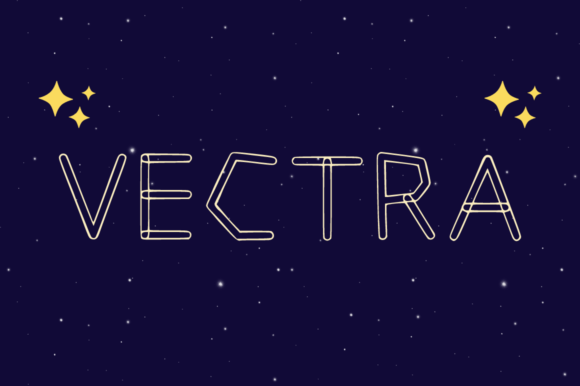
Vectra Display Font for Retro Web Design
Vectra is a playful and versatile display font with a retro twist that instantly elevates the visual hierarchy of modern digital products. As a web designer, I often struggle to find typefaces that balance nostalgic charm with the strict readability requirements of responsive interfaces, but Vectra solves this by offering both outline and filled styles within a single package. This dual-variation capability allows us to create dynamic contrast in hero sections without compromising the user experience on mobile devices or small screens.
Vectra for Hero Sections and Landing Page Headlines
When you need a Display font that commands attention immediately upon landing page entry, Vectra provides the perfect blend of personality and structure. The filled style of this typeface creates a bold, solid presence that works exceptionally well for large-scale hero titles where legibility against complex background images is critical. In contrast, the outline variation offers a lighter, more airy aesthetic that can be used over dark backgrounds or photographic overlays to maintain visual interest without overwhelming the primary message. By utilizing these distinct weights, designers can guide the user's eye down the page, establishing a clear path from the headline to the call-to-action button.
- Hero Impact: Use the heavy filled style for main headlines to ensure they stand out above the fold.
- Layered Depth: Apply the outline version over busy textures or gradients to create a subtle, vintage effect that doesn't distract from content.
- Retro Branding: Leverage the nostalgic character of Vectra to evoke trust and familiarity in brands targeting millennials or Gen Z audiences.
Vectra for E-commerce Banners and Product Labels
In the competitive world of online retail, a creative font like Vectra can be the deciding factor between a scroll-past and a click-through. When designing product banners or promotional sliders for an online store, the unique curves of Vectra add a touch of warmth that generic sans-serif fonts often lack. The outlined letters work beautifully as text-on-image elements for sale tags or limited-time offer badges, providing high contrast while maintaining a stylish edge. Because Vectra is optimized for short phrases and impactful statements, it ensures that pricing, discounts, and key selling points are communicated instantly to the shopper.
Vectra for Blog Headers and Content Section Titles
While body copy requires neutral and highly readable typography, section headers in blog posts or article layouts benefit significantly from the character found in Vectra Fonts. Using this typeface for H2 and H3 tags breaks up long walls of text and invites the reader to engage with the content. The retro aesthetic suggests a curated, editorial feel, which can elevate the perceived value of digital magazines, newsletters, or personal portfolios. For SaaS founders and tech bloggers, pairing Vectra with a clean, geometric sans serif for body text creates a sophisticated juxtaposition that feels modern yet grounded in design history.
- Visual Rhythm: Alternate between filled and outline styles in your heading hierarchy to create a natural scanning flow.
- Brand Consistency: Maintain a consistent usage rule across all pages to reinforce brand identity and professional polish.
- Mobile Optimization: Ensure the font size remains large enough on mobile screens so the intricate details of the outline style remain visible.
Vectra for Digital Ads and Social Media Graphics
The versatility of Vectra makes it an essential asset for creating social media graphics that stop the scroll in crowded feeds. Whether you are designing static ads for Instagram, LinkedIn banners, or YouTube thumbnails, the retro twist of this font captures attention through its distinctive silhouette. The ability to switch between filled and outline modes allows marketers to adapt the same typographic asset to different color palettes and background environments without losing the core brand voice. This flexibility reduces the need for multiple font purchases, streamlining the workflow for digital product creators who need to produce high volumes of content quickly.
Vectra for UI Buttons and Interactive Elements
Although decorative fonts are often avoided for functional UI elements, Vectra proves that modern typography can enhance interactivity when used strategically. Applying the font to primary buttons or navigation labels can inject a sense of fun and approachability into an application or website. However, caution is required; the outline style may lose definition at very small sizes, making the filled weight the safer choice for clickable areas on mobile interfaces. When paired with a minimalist interface, these interactive elements become focal points that encourage conversion without feeling out of place.
Vectra for Logo Design and Brand Identity Systems
For creative entrepreneurs building a brand identity, Vectra serves as a powerful tool for logo design and stationery assets. Its playful nature communicates creativity and innovation, making it ideal for agencies, boutique studios, and lifestyle brands. The font's retro characteristics help establish a unique market position, distinguishing a business from competitors who rely on standard corporate typefaces. When integrating Vectra into a full brand kit, consider how the outline and filled variations interact with other design elements to ensure a cohesive look across all touchpoints, from business cards to website headers.
Vectra Font Pairing Strategies for Web Layouts
Successful web design relies heavily on effective font pairing, and Vectra pairs exceptionally well with simple, understated typefaces. A clean sans serif font like Inter, Roboto, or Helvetica serves as an excellent companion for body copy, allowing the display font to shine in headings without causing visual fatigue. Alternatively, pairing Vectra with a classic serif font can create an elegant, editorial vibe suitable for luxury brands or high-end fashion e-commerce sites. The key is to let Vectra handle the emotional connection while the secondary font manages the information density and readability.
Vectra Licensing and Commercial Usage Guidelines
Before implementing Vectra in client projects or commercial websites, it is crucial to review the specific commercial font license included with the purchase. Most premium fonts cover web embedding, desktop installation, and app development, but some may have restrictions on the number of page views or active users. Ensuring you have the correct license protects your agency and clients from legal issues while guaranteeing access to all necessary file formats for web deployment. Always verify multilingual support if your project targets international audiences, as the retro style should remain intact across different languages and scripts.